- YouTube automation
YouTube AutomationYouTube and TikTok channels automated with Claude Code
Studios driven by Claude produce my YouTube and TikTok channels: from the idea to the scheduled video, graded by a second agent.

Launch film · English voice-over and captions · 1:42
The film, in text
My YouTube and TikTok channels run almost on their own. Here is how I built them. It all starts with one folder. Each channel has its own studio in it, laid out the same way: Claude’s rules, the tools, the channel’s bible, the deliveries.
Three families: original content, 3D staged in code, and reused videos, reframed and re-edited.
To start a video, I type "short" in the studio’s conversation. Or I paste a link, or drop a video in its folder.
Claude researches the topic, writes the script, records the voice, makes the pictures, edits, and mixes the sound.
Then a checking script combs through the video, and a second agent grades it, the way a viewer would.
Every remark I make becomes a rule, and often an automatic check.
The video lands in Delivery, with its thumbnail, title and description.
The studios live in OneDrive: my Mac and my PC work in them at the same time, never in the same studio.
On the PC, I start Remote Control from the terminal, and drive it from my Mac, my iPad or my phone.
Claude picks the videos up from OneDrive and schedules them on YouTube and TikTok.
To keep track of it all, I built a base, like in a management game: each channel is a building.
Soldiers work while a studio runs, raise a sign when it waits for me, and sleep when all is quiet.
The base also shows the release schedule, and the road to monetization.
For the numbers, Studio HQ: a dashboard plugged into the YouTube, TikTok and ElevenLabs APIs.
Views, retention, alerts, costs: like my Power BI dashboards, but for my channels.
Independent tools, wired into each other: from idea to release, everything is under control.
At a glance
- typed to Claude starts a video: “short”
- 1 word
- of studios: original content, 3D, reused videos
- 3 families
- render at once, never the same studio
- Mac + PC
- between two updates of the 3D base
- 30 s
The tools, screen by screen
9 screens from my tools, each with what it shows. Screenshots of my own tools, run locally on invented channels, videos and figures. They are in French, as I use them.
Each channel is a building, in its family’s enclosure. My apps and my tools have theirs too.
- One enclosure per family of channels
- One building per channel, under its name
- How many conversations are waiting for me, and which have finished
- One button takes me to what is waiting for me
Soldiers work while a conversation runs, raise a sign when it waits for me, and sleep when all is quiet.
- At work: Claude is making a video
- An exclamation mark: the conversation is waiting for me
- At rest
- One button opens the conversation in the Claude app
Every channel’s releases, month by month, read straight from YouTube: what is out, what is scheduled.
- Three views: the month, one row per channel, the list
- One filter per channel
- The months in miniature: out in blue, scheduled in orange
- The day’s releases, hour by hour
For each channel, the base tracks the YouTube Partner Programme thresholds and says what is still missing.
- Where all the channels stand
- The closest channel, and what it lacks
- One bar per Partner Programme threshold
- The first tier, and when to apply
Studio HQ brings every channel’s numbers together: subscribers, views, watch time, estimated revenue, and what needs handling.
- What needs handling, first
- Views from the last few hours, live
- The key figures over 28 days, against the period before
- Every channel, day by day
One card per channel: its subscribers, its views over 28 days, its curve, its cadence and its road to monetization.
- Each channel, its format and its status
- Its views day by day, over 90 days
- The cadence: videos out against the target
- What stands between it and monetization
Every video has its own page: views, retention, subscribers gained, estimated revenue, and its start hour by hour.
- Retention: how much of the video is watched on average
- Its details: format, language, tags
- Its start, read every 10 minutes
- Against the median of the channel’s previous Shorts
Worked out again on every visit: a channel that has stopped publishing, voice credits about to run out, a month covered or not by revenue.
- Sorted by severity
- One filter per channel
- Voice credits that will run out before renewal
- A channel that has stopped publishing
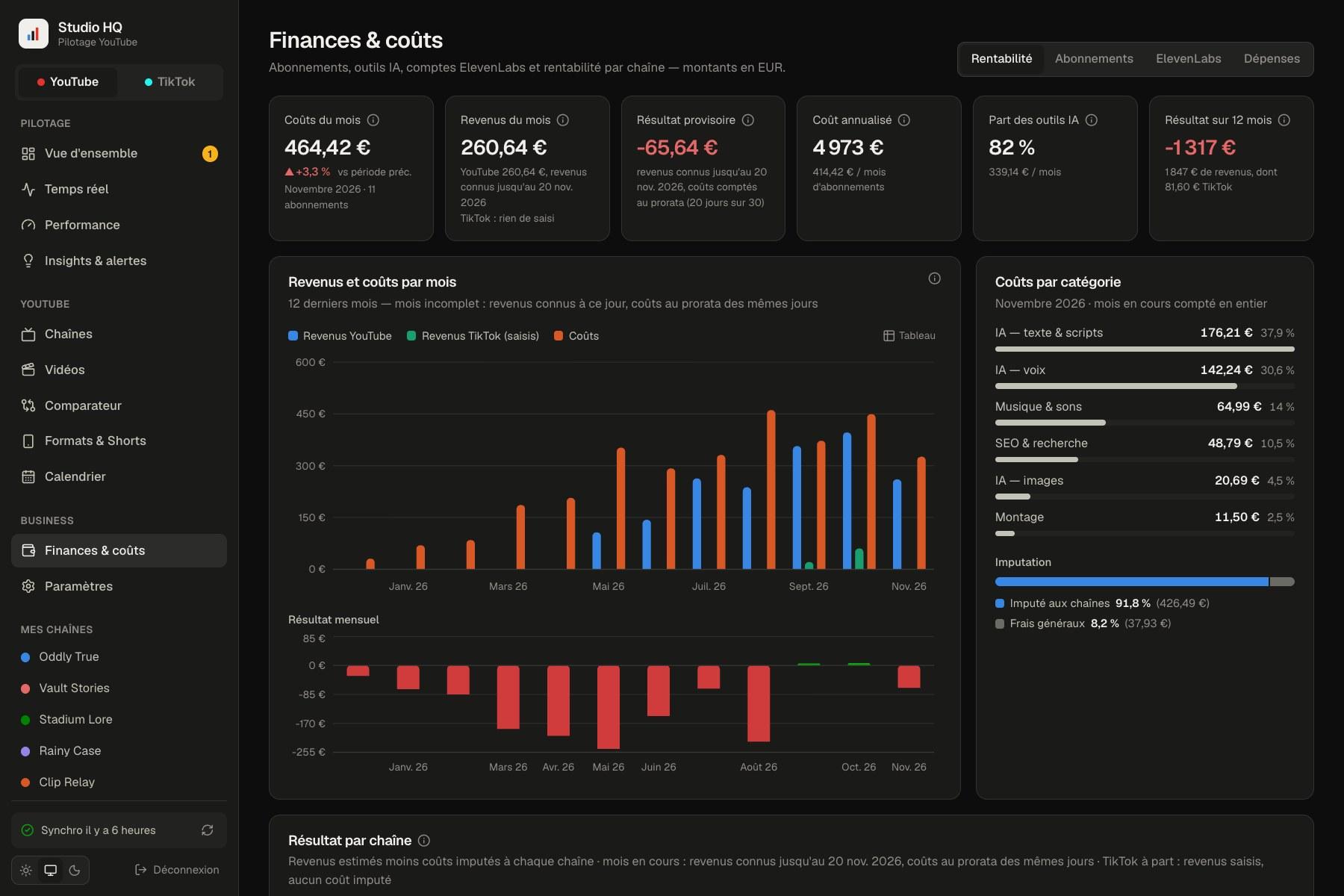
Revenue and costs month by month, in euros at the European Central Bank’s rate, and each month’s result.
- The month’s costs and revenue
- YouTube and TikTok revenue against costs, month by month
- Each month’s result
- Costs by category, and the share charged to each channel
01 / 09
01 / 09
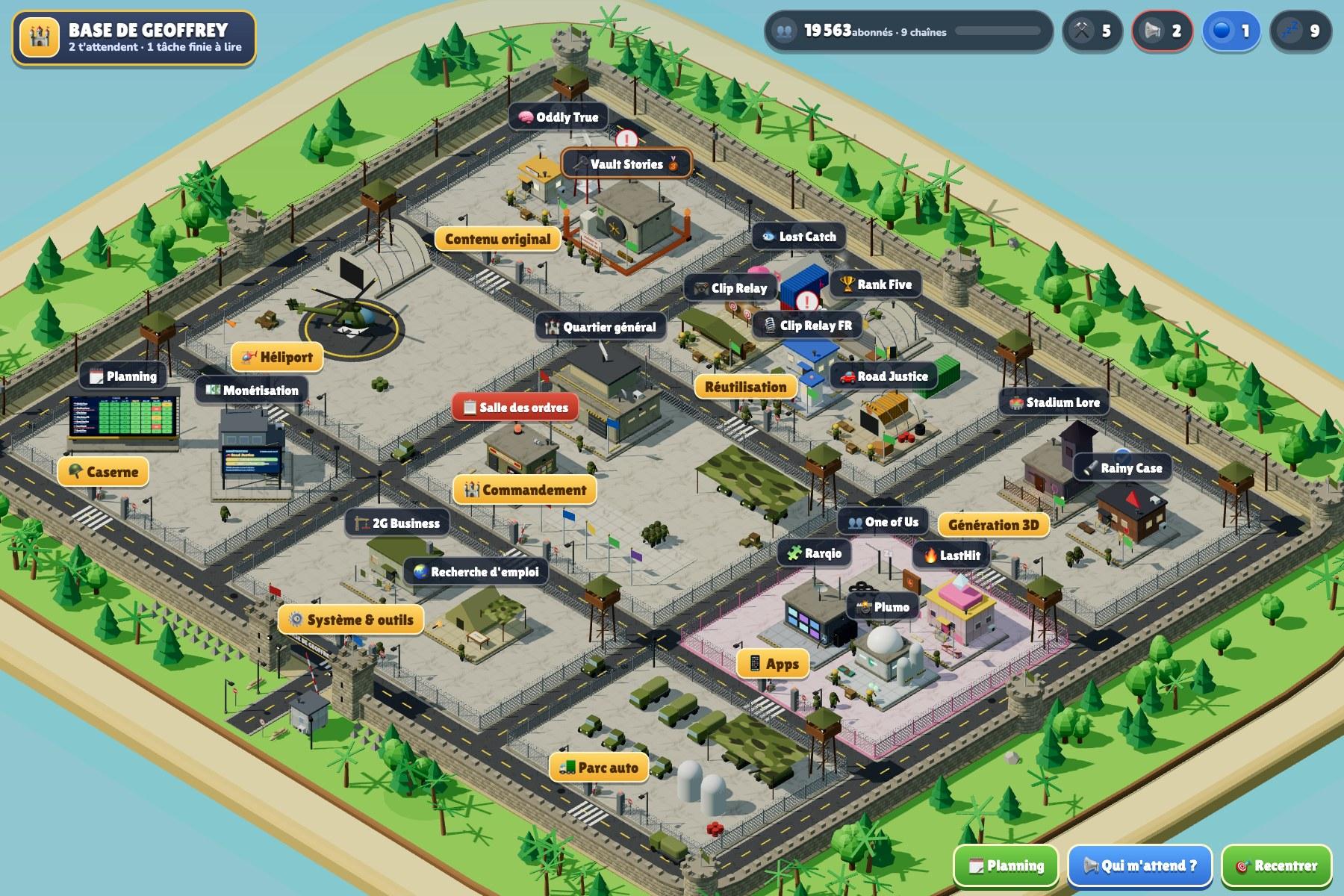
The base
Each channel is a building, in its family’s enclosure. My apps and my tools have theirs too.
- One enclosure per family of channels
- One building per channel, under its name
- How many conversations are waiting for me, and which have finished
- One button takes me to what is waiting for me
02 / 09
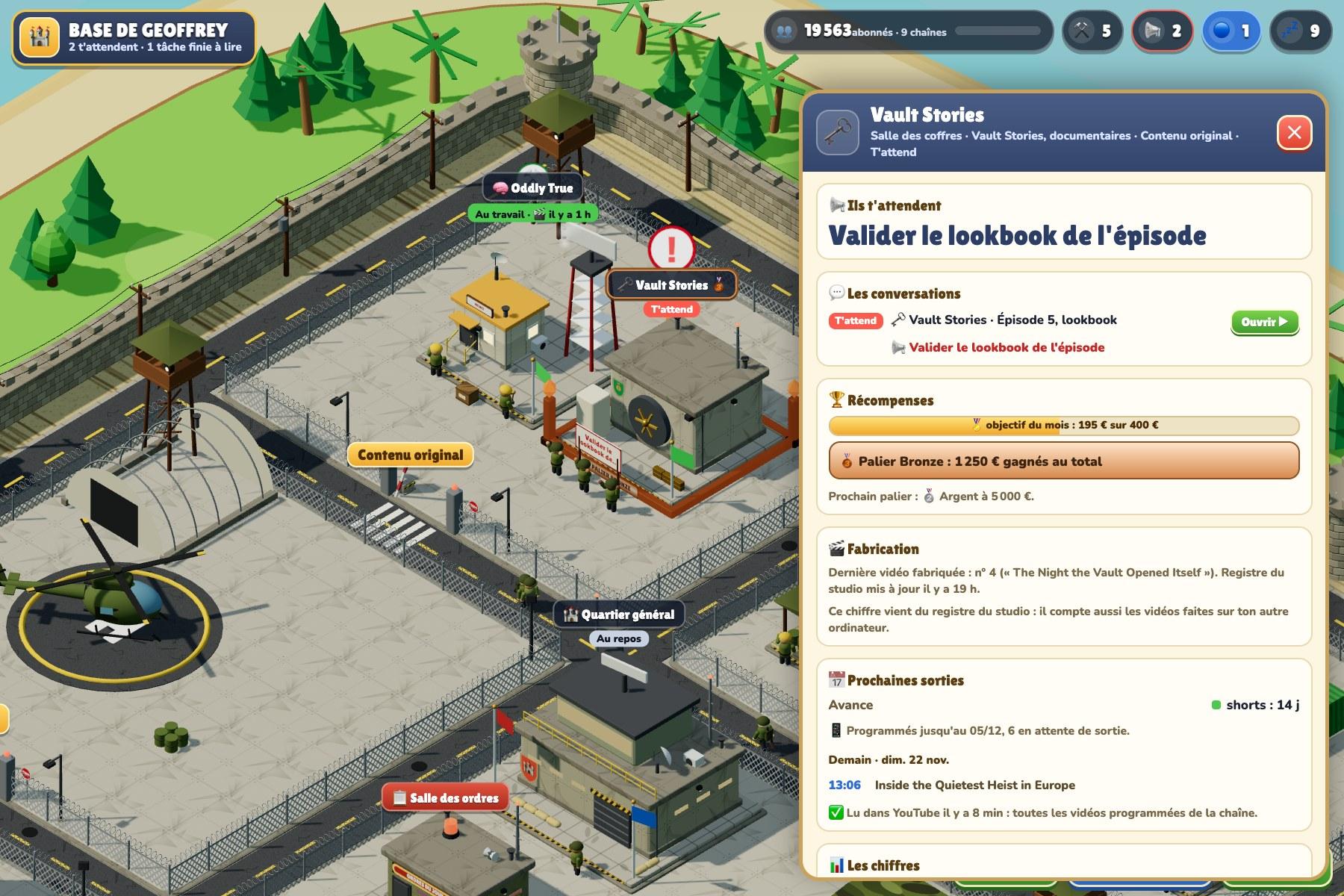
Who is waiting for me
Soldiers work while a conversation runs, raise a sign when it waits for me, and sleep when all is quiet.
- At work: Claude is making a video
- An exclamation mark: the conversation is waiting for me
- At rest
- One button opens the conversation in the Claude app
03 / 09
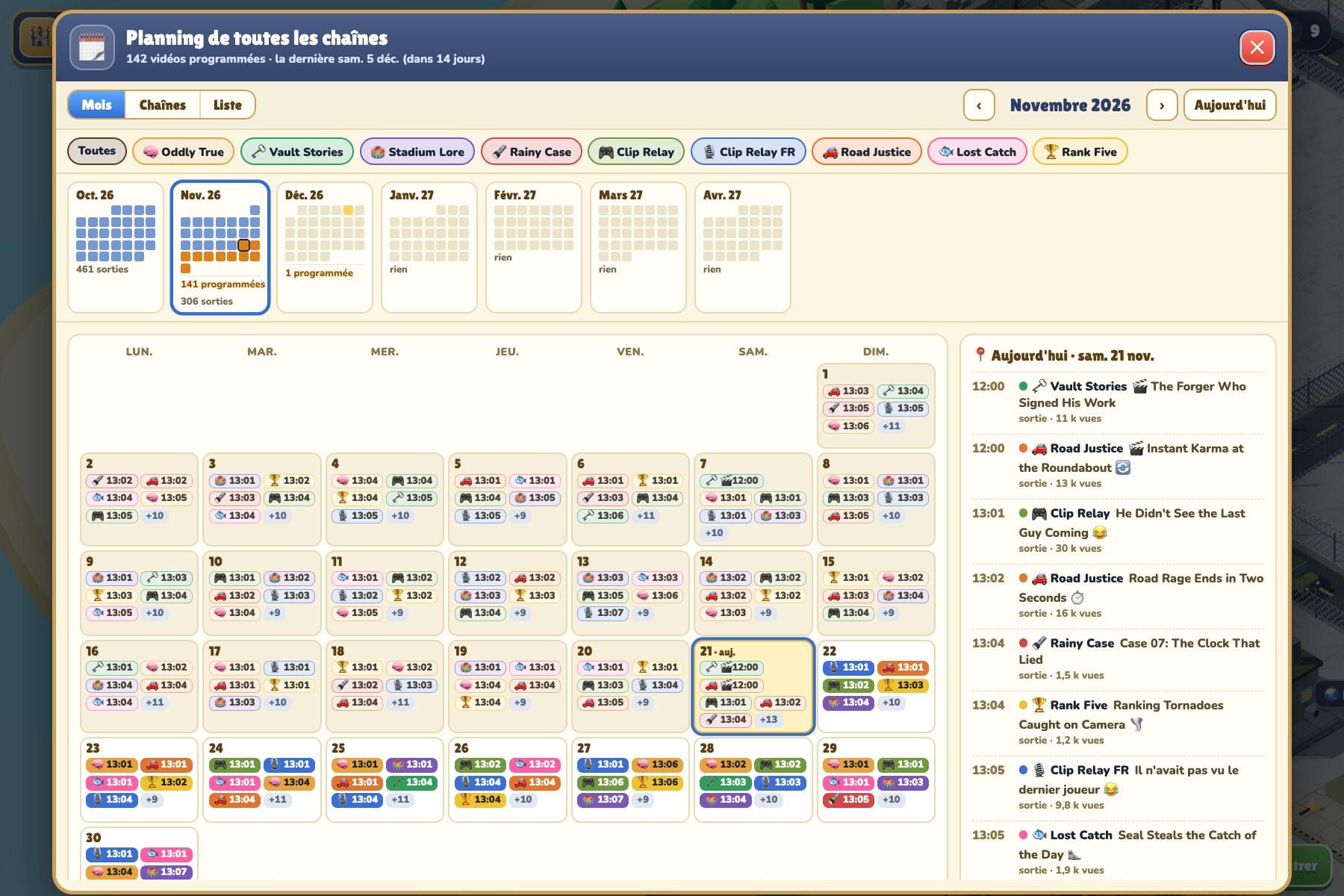
The schedule
Every channel’s releases, month by month, read straight from YouTube: what is out, what is scheduled.
- Three views: the month, one row per channel, the list
- One filter per channel
- The months in miniature: out in blue, scheduled in orange
- The day’s releases, hour by hour
04 / 09
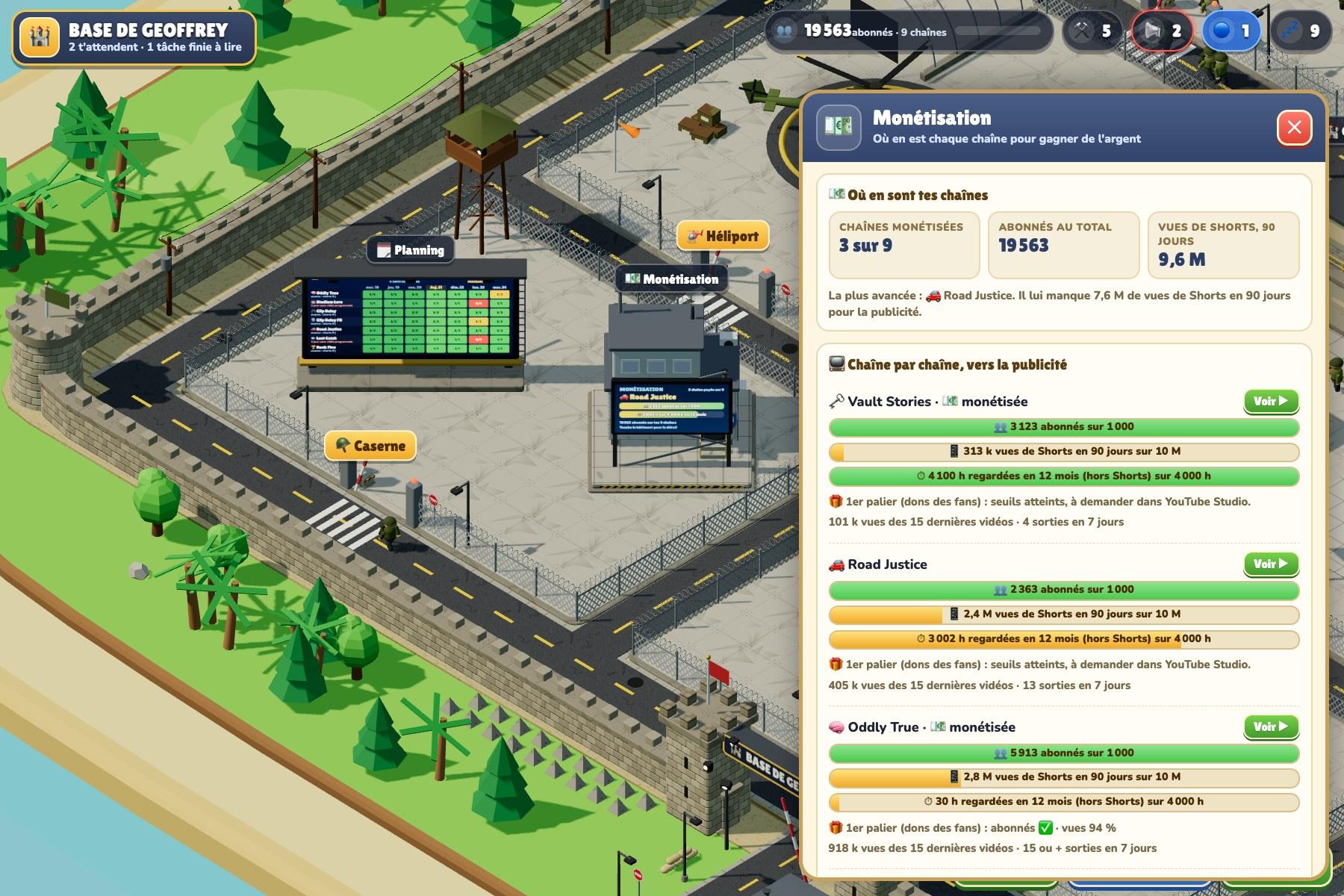
The road to monetization
For each channel, the base tracks the YouTube Partner Programme thresholds and says what is still missing.
- Where all the channels stand
- The closest channel, and what it lacks
- One bar per Partner Programme threshold
- The first tier, and when to apply
05 / 09
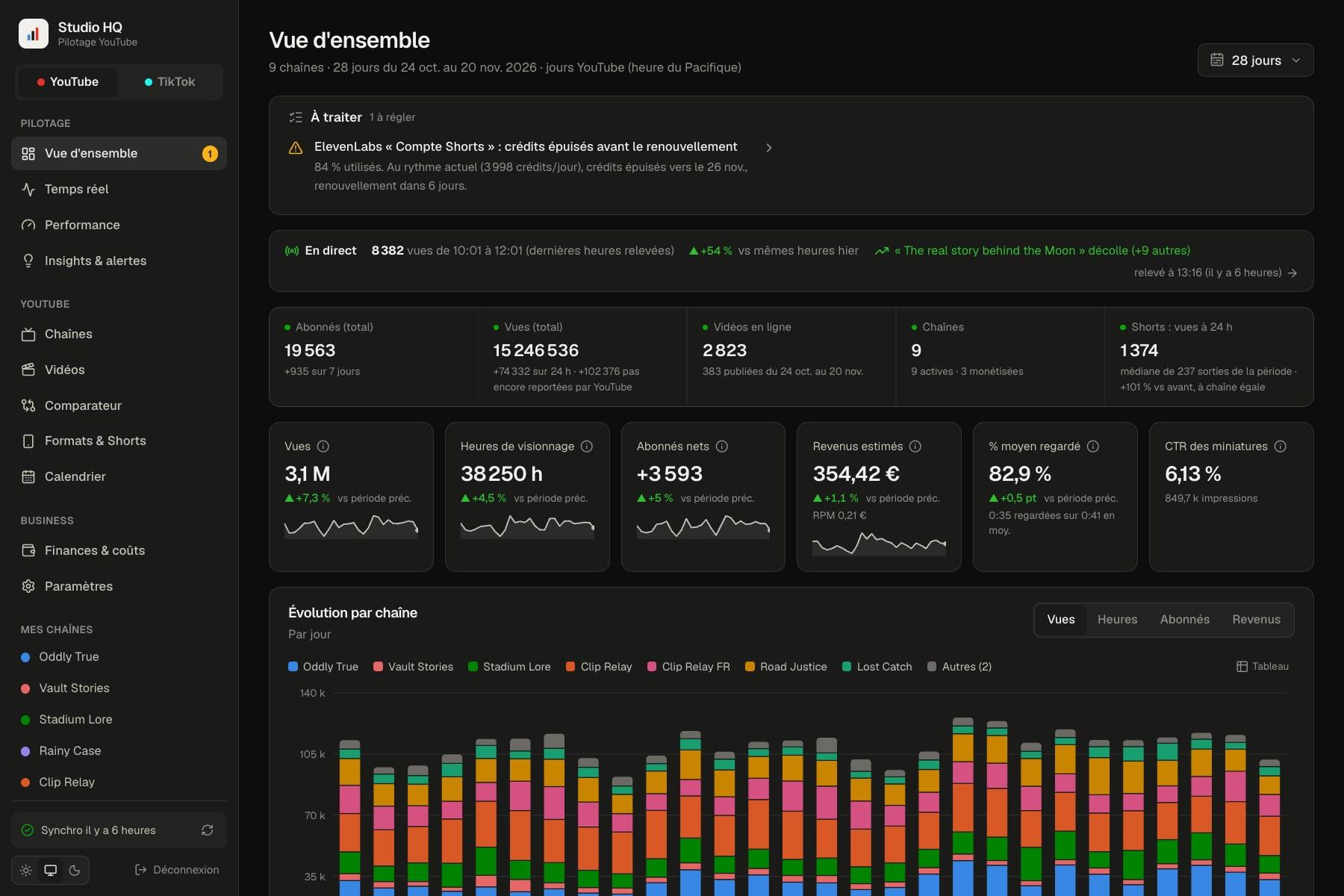
Studio HQ, the overview
Studio HQ brings every channel’s numbers together: subscribers, views, watch time, estimated revenue, and what needs handling.
- What needs handling, first
- Views from the last few hours, live
- The key figures over 28 days, against the period before
- Every channel, day by day
06 / 09
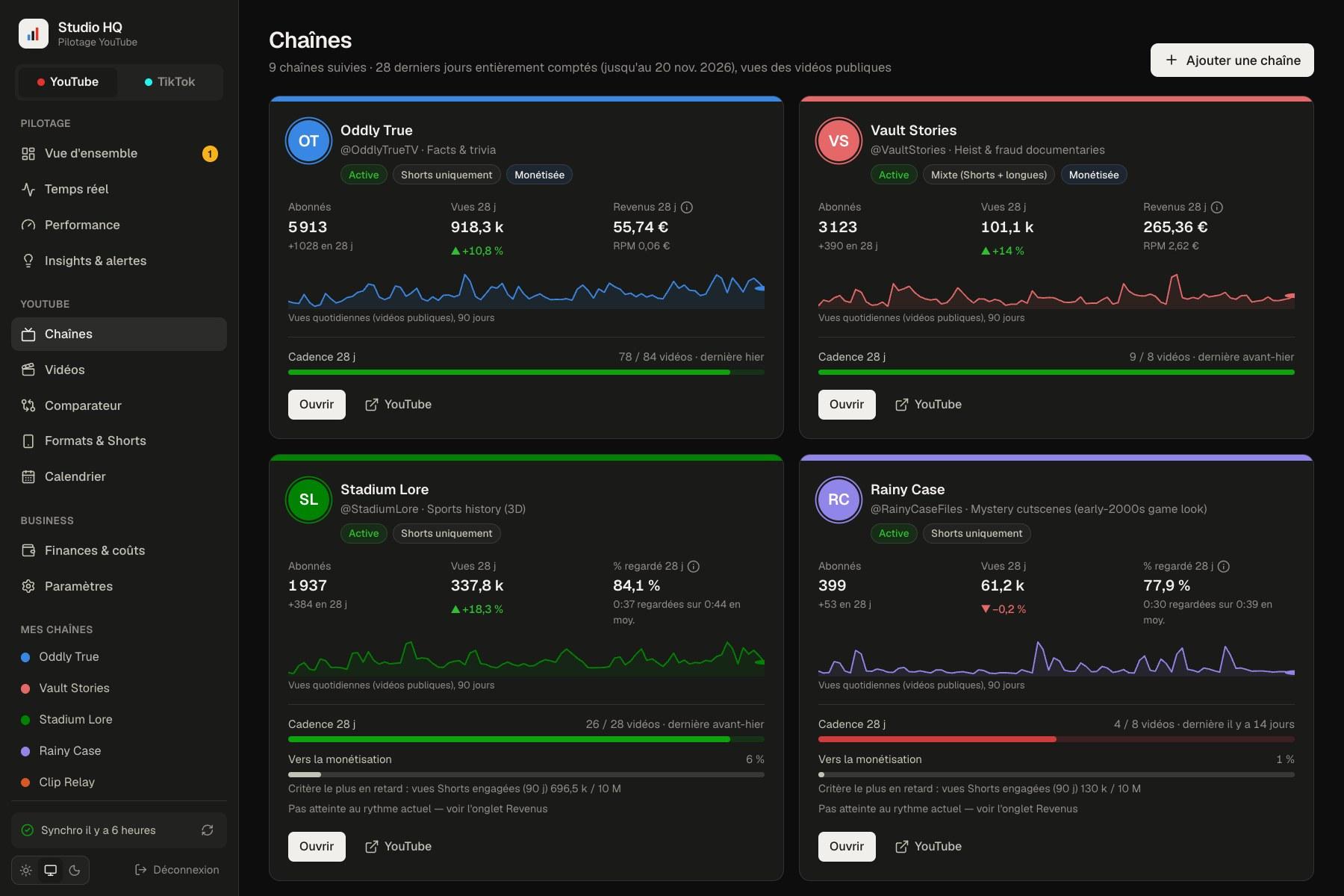
The channels
One card per channel: its subscribers, its views over 28 days, its curve, its cadence and its road to monetization.
- Each channel, its format and its status
- Its views day by day, over 90 days
- The cadence: videos out against the target
- What stands between it and monetization
07 / 09
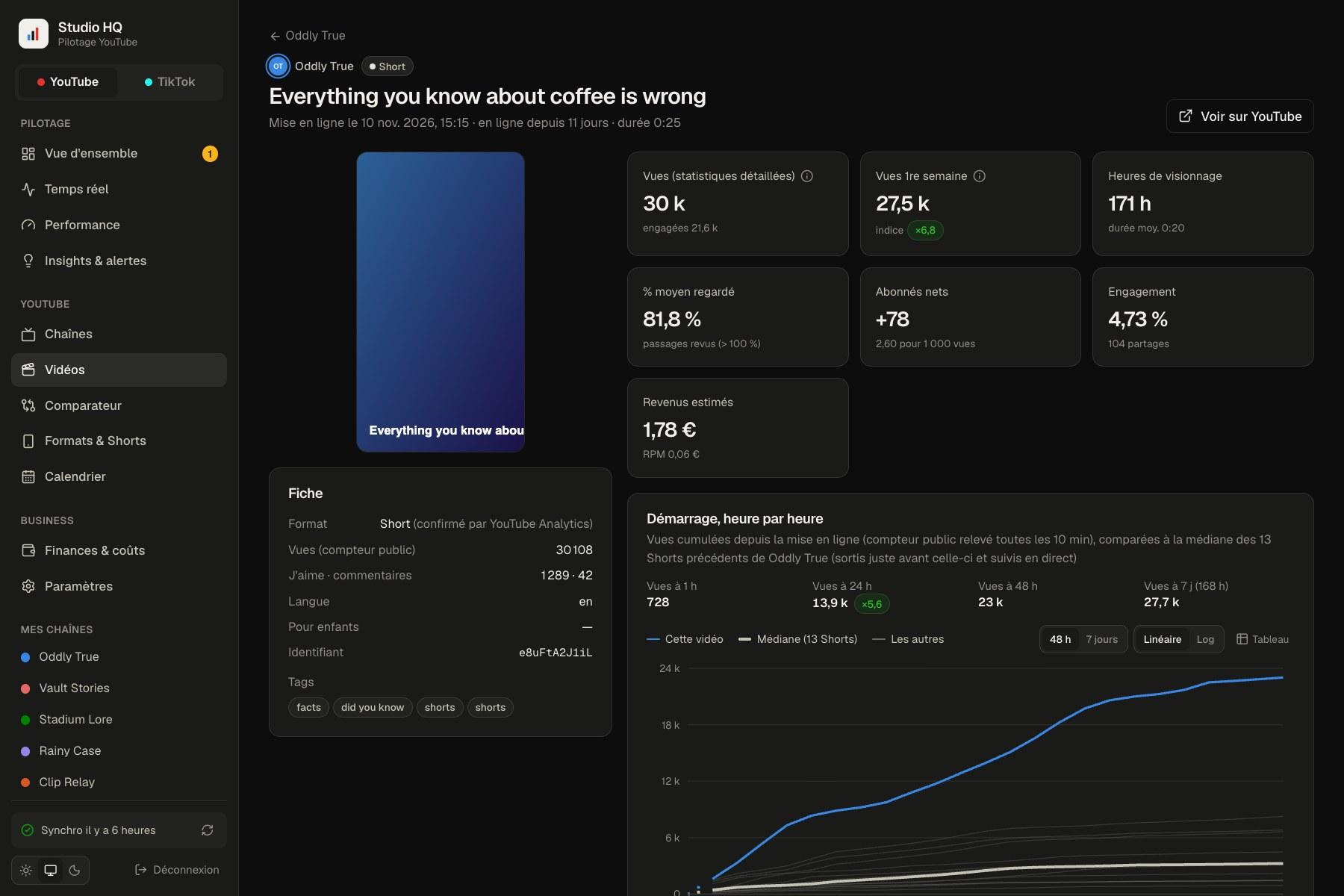
One video
Every video has its own page: views, retention, subscribers gained, estimated revenue, and its start hour by hour.
- Retention: how much of the video is watched on average
- Its details: format, language, tags
- Its start, read every 10 minutes
- Against the median of the channel’s previous Shorts
08 / 09
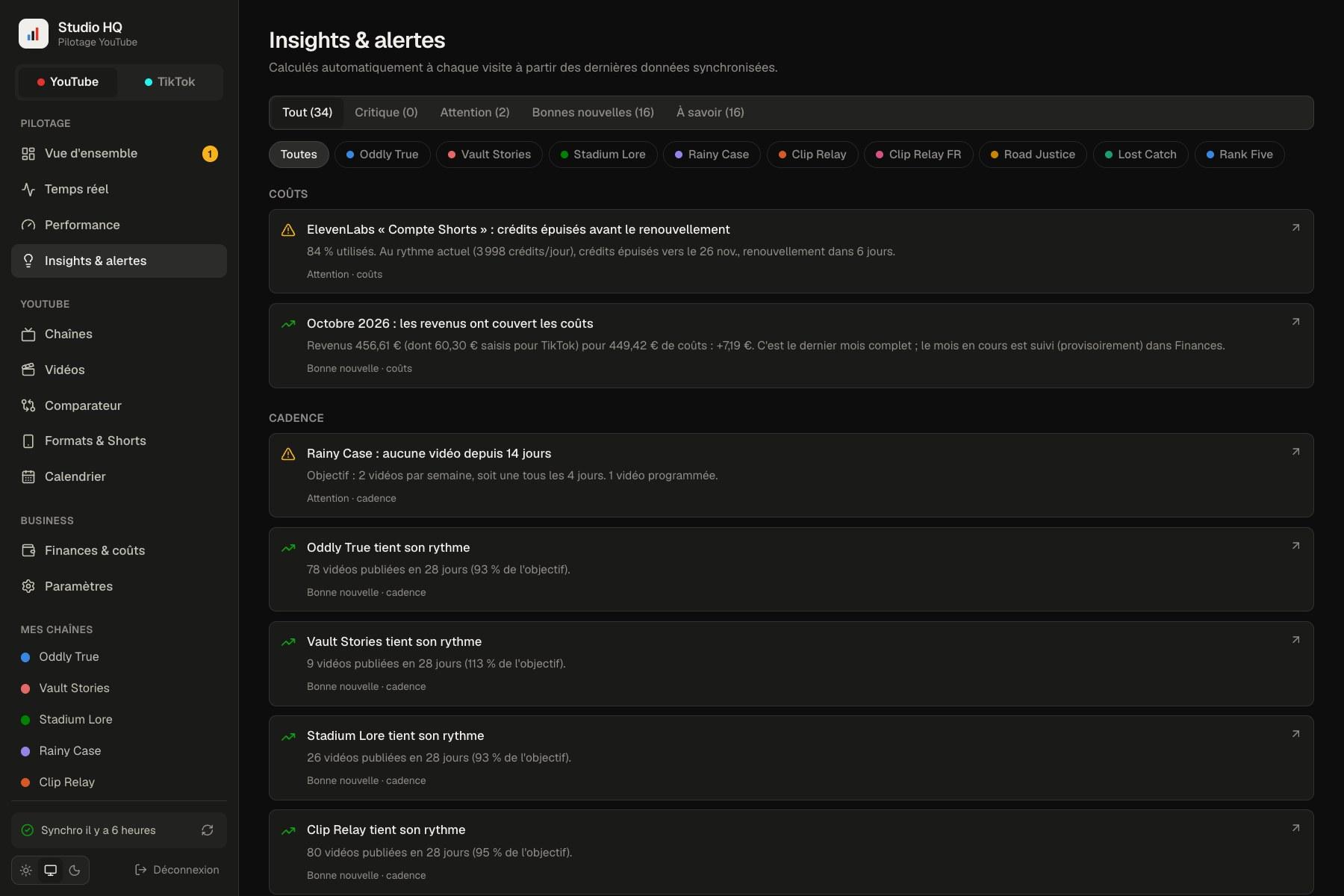
The alerts
Worked out again on every visit: a channel that has stopped publishing, voice credits about to run out, a month covered or not by revenue.
- Sorted by severity
- One filter per channel
- Voice credits that will run out before renewal
- A channel that has stopped publishing
09 / 09
Finances and costs
Revenue and costs month by month, in euros at the European Central Bank’s rate, and each month’s result.
- The month’s costs and revenue
- YouTube and TikTok revenue against costs, month by month
- Each month’s result
- Costs by category, and the share charged to each channel
01 / 09
Under the hood
- Claude Code
- Python
- ffmpeg
- faster-whisper
- ElevenLabs
- HyperFrames
- GSAP
- three.js
- Next.js
- PostgreSQL
- YouTube API
- TikTok API
A second pair of eyes
Before delivery, a second agent that did not edit the video watches it and grades it on a grid.
Every remark becomes a rule
What I correct once goes into the studio’s rules, and often into its automatic checks.
A base like a game
One glance is enough: every conversation is a building, and its soldiers work, wait for me or sleep.
The full case study
My role
A personal project designed and built end to end: how the studios are organised, their making and checking tools, Claude’s rules, the publishing, the 3D base, the Studio HQ dashboard and the presentation film.
The problem
Running several channels of short videos means repeating the same steps every day: finding a topic, writing, recording the voice, making the pictures, editing, checking, publishing, then following each channel’s numbers. By hand, every video takes all of those steps, and a mistake fixed one day can come back the next.
The solution
Each channel has its studio in a OneDrive folder, laid out the same way: Claude’s rules, the tools, the channel’s bible, the deliveries. One Claude conversation per studio, filed by family: original content, 3D staged in code, reused videos reframed. To start a video, I type “short” in the conversation, or paste a link into it; some studios start from a video I first drop in their folder. Claude researches the topic, writes the script, records the voice with ElevenLabs, makes the pictures, edits and mixes. A checking script combs through the video and refuses delivery on any fault, then a second agent, which did not edit it, watches it and grades it. The video lands in Delivery with its thumbnail, title and description, and Claude schedules it on YouTube and TikTok. My Mac and my PC work at the same time, never in the same studio, and I drive the PC remotely. To follow it all, a 3D base, like a management game, and Studio HQ, a dashboard plugged into the YouTube, TikTok and ElevenLabs APIs.
What was hard
Never delivering a botched video: each studio has its checking script, which refuses delivery on any failed point. A second agent, which did not edit the video, then watches it cold and grades it on a grid.
Making a fix stick: every remark I make goes into the studio’s register of guidelines, and often becomes one more check in its control script.
Letting two machines work on the same OneDrive folders without stepping on each other: a lock says which machine holds a studio, and the other stays out.
Seeing at a glance which conversation is waiting for me: the base rereads the state of every conversation in the Claude app every 30 seconds, and its soldiers work, raise a sign or sleep.
Getting the numbers right: Studio HQ cross-checks the YouTube, TikTok and ElevenLabs APIs, and converts revenue and costs into euros at the European Central Bank’s rate.